One-to-one payment links
Generate a unique link tied to a patient and encounter. Use it for pre-service collections, day-of-service payments, or balances identified after the insurer’s explanation of benefits.

PayLink
Turn a balance into a clear action. PayLink gives your team patient-specific links for collecting responsibility before or after care, with a familiar digital checkout on the other end.
For front-desk, billing & revenue cycle teams
Connected by HealthMe
Create a link for the patient’s responsibility.
Reach one patient or run a balance campaign.
Patients open the link and choose how to pay.
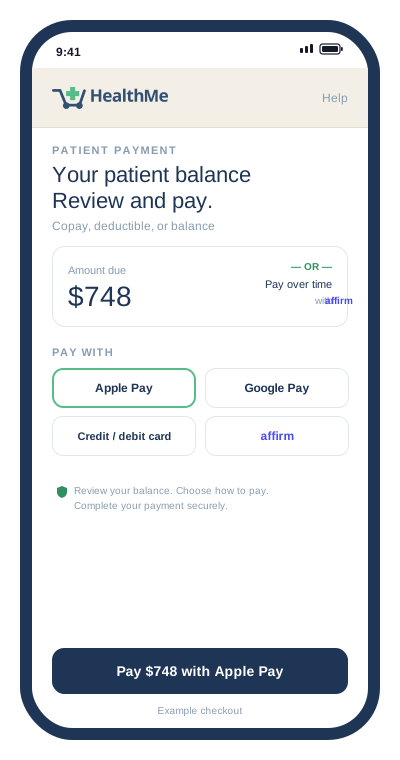


With Apple Pay and Google Pay, patients can use their saved payment details to make the payment step quick and familiar.

Affirm gives eligible patients the option to spread payments over time, right from the same HealthMe checkout.
Credit and debit cards, too.




Built for this moment
Deductibles, copays, coinsurance, and small outstanding balances create work across the practice. PayLink gives those collection moments a consistent patient experience.
Generate a unique link tied to a patient and encounter. Use it for pre-service collections, day-of-service payments, or balances identified after the insurer’s explanation of benefits.
Upload a CSV of outstanding patient balances and send payment links across a patient list. Give the billing team a practical way to reach more patients through the same checkout.
Patients can use supported digital payment methods, with Affirm financing available for eligible transactions. Financing approval and terms are presented through the checkout process.
How it works
Keep the payment request specific: who it is for, how much is due, and a direct way to complete the next step.
Use the amount established through your billing or pre-service workflow.
Prepare an individual payment request or a CSV-based campaign for outstanding balances.
The link opens digital checkout, including eligible financing options where offered.
Review payment activity and deposits through the practice’s configured HealthMe workflow.
Putting it into practice
PayLink fits the collection points your team already manages. During setup, HealthMe works with billing and front-desk staff to define when links are sent, who owns follow-up, and how payment activity is reconciled.
A few more details
Core supports the purchase of self-pay care packages. PayLink collects a patient’s financial responsibility, such as a deductible, copay, coinsurance, or outstanding balance.
Yes. PayLink Campaigns supports uploading a CSV of outstanding balances so your billing team can send payment links across a patient list.
No. Patients can choose from the payment options offered at checkout. Financing is an additional option for eligible patients and transactions, subject to the financing provider’s approval and terms.
A better way forward
See how PayLink fits your patient responsibility workflow.